

Getting the JL66 app onto your phone takes under two minutes, and on Android it comes as a direct APK download straight from the official JL66 website. Because JL66 has a wide network of lookalike domains, the single most important rule is simple: only download the APK from the official source. This guide walks Filipino players through installing JL66 on Android, running it on iPhone, and playing instantly through a mobile browser if you’d rather skip the install altogether. If you’re still weighing things up first, our JL66 legit check covers what the platform does and doesn’t disclose. Here’s how to get JL66 on Android and iPhone the safe way.
Is the JL66 app safe to download? What to check first
The JL66 app is safe to install as long as you download the Android APK from the official JL66 website and nowhere else. Because dozens of copycat and mirror domains use the JL66 name, a file from any other page can’t be trusted. Get the APK from the official URL, and delete anything you downloaded from a third-party site, a group chat, or a search result you’re unsure about.
You won’t find JL66 on the Google Play Store, and that’s expected rather than a warning sign. Google and Apple restrict real-money casino apps in the Philippines, so operators distribute an Android APK directly instead. This is standard practice across the PH market, not something unique to JL66.
One point worth knowing before you install and deposit: JL66 does not display a licence number on its official site. The footer shows a 21+ age notice and nothing else, which is less transparency than a domestically licensed operator would typically provide. That doesn’t prove anything on its own, but it’s a fair thing to weigh before you commit money. On age, the rule is firm, JL66 is strictly for players aged 21 and over, in line with Philippine gaming law.
How to download and install the JL66 APK on Android
Installing JL66 on Android uses an APK file from the official website, and the whole process is quick once you know the steps. Follow these in order:
- Open the official JL66 website in your Android browser. Type or bookmark the official URL directly, don’t reach it through an ad or an unfamiliar link.
- Find the “Download App” or “Android APK” button on the site and tap it. The APK file saves to your device’s Downloads folder.
- Go to Settings, then Security (or Apps, depending on your phone), and enable “Install from Unknown Sources” for your browser. Android requires this for any app installed outside the Play Store.
- Open the downloaded APK file from your Downloads folder or notification bar.
- Follow the on-screen installation prompts. Installation finishes in roughly 30 seconds.
- Open the JL66 app and log in, or register if you’re a new member.
A quick safety reminder before you tap install: only use the APK from JL66’s official website. If you have a JL66 file from any other source sitting in your Downloads, delete it now. A genuine APK and a repackaged one can look identical, so the source is what keeps you safe. Once you’re in, our JL66 login guide covers sign-in and password resets if you get stuck.

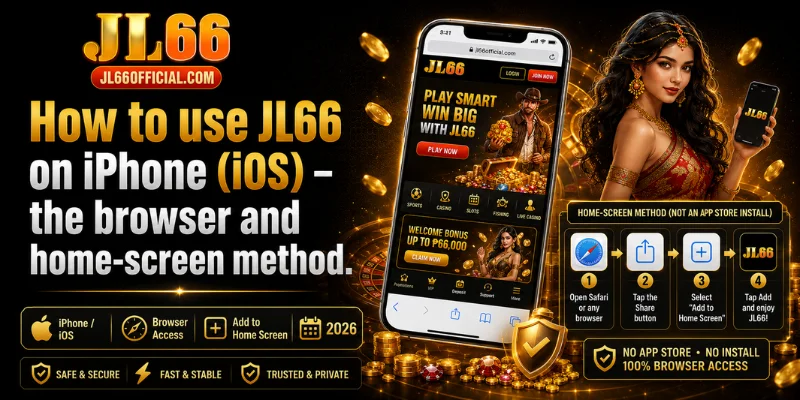
How to use JL66 on iPhone (iOS) – the browser and home-screen method
JL66 does not have a native iPhone app, because Apple restricts real-money betting apps on the App Store. Instead, iPhone and iPad players access JL66 through Safari, and can add it to the home screen so it opens like an app. This is a real limitation worth flagging: iOS players don’t get a downloadable app, only the browser route.
To add JL66 to your iPhone home screen:
- Open the official JL66 website in Safari (this method needs Safari, not Chrome).
- Tap the Share icon at the bottom of the screen, the box with an upward arrow.
- Scroll and select “Add to Home Screen.”
- Tap “Add.” A JL66 icon now sits on your home screen.
Once added, the home-screen shortcut behaves much like an app, it opens full-screen, loads the same games, and uses no App Store download or extra storage. For most iPhone players, this is the closest thing to a JL66 app you’ll get.
Prefer no install? Play JL66 in your mobile browser
If you’d rather not install anything, JL66 runs fully inside your mobile browser. This suits players on low-storage phones, anyone cautious about APKs, and first-timers who want to look around before committing to an install. Just open the official JL66 URL in Chrome or Safari and log in.
The browser version is fully responsive, so nothing is stripped back. You can play slots, live casino, and fishing games, make GCash and Maya deposits, and request withdrawals, all without downloading a file. It’s the fastest way to start and a sensible default if you’re still deciding.
What you can do in the JL66 app
The JL66 app gives you the full platform on mobile, with the same game library and payment options as the desktop site. On the games side, you get slots from JILI, PG Soft, JDB, FC (Fa Chai) and CQ9, live casino tables, fishing games, and Spribe crash games like Aviator.
For banking, the app supports GCash and Maya for both deposits and withdrawals. GCash withdrawals process in around 3 to 5 minutes with no transaction fees, which is one of JL66’s genuinely strong points. Whether you install the APK, add JL66 to your iPhone home screen, or stick with the browser, the experience and cash-out speed are the same. You can start from the JL66 homepage whichever route you pick.
JL66 app not installing? Common issues and fixes
Most JL66 install problems trace back to one of a few common causes, and the fixes are quick. Here’s how to sort them:
| Issue | Likely cause | Fix |
|---|---|---|
| “Install blocked” message | Unknown Sources not enabled | Re-open Settings › Security and enable installs for your browser, then retry |
| APK won’t open | File didn’t download fully or is corrupted | Delete it and re-download from the official JL66 site |
| App crashes on launch | Android version too old | Update your Android OS, then reopen the app |
| iPhone says it can’t install the app | There is no native iOS app | Use the Add to Home Screen method in Safari instead |
If none of these solve it, JL66’s live chat is available around the clock. Have your registered mobile number and account name ready so support can help faster.
Frequently asked questions about the JL66 app
Is the JL66 app free to download?
Yes, the JL66 app is free to download and install. There’s no charge for the Android APK, and the iPhone home-screen method and mobile browser version are free too. You only need funds when you choose to deposit and play.
Is the JL66 Android APK safe?
The APK is safe when you download it from the official JL66 website and nowhere else. Because JL66 has many copycat domains, files from third-party sites, mirror pages, or chat links can’t be trusted. Stick to the official source and delete anything downloaded elsewhere.
Why isn’t JL66 on the Google Play Store?
Real-money casino apps are restricted on the Google Play Store in the Philippines, so JL66 is distributed as a direct APK from its official site instead. This is normal across the PH market and is why the official-source rule matters so much.
Does JL66 have an iPhone app?
No, JL66 doesn’t offer a native iPhone app, because Apple restricts real-money betting apps. iPhone players use JL66 through Safari and can add it to the home screen for app-like access, or simply play in the browser.
Can I use JL66 without downloading the app?
Yes. JL66 runs fully in Chrome or Safari on mobile, with all games and payment methods available. Downloading the app is optional, not required, to play.
Does the JL66 app support GCash?
Yes, GCash is supported for both deposits and withdrawals on the JL66 app and browser. GCash withdrawals typically clear in 3 to 5 minutes with no fees.
Start playing JL66 on mobile
Getting started on mobile with JL66 is straightforward: Android players install the free APK from the official website, iPhone players add the site to their home screen through Safari, and anyone can play instantly in a mobile browser. Whichever route you take, download only from the official JL66 source, keep clear of third-party APKs, and remember the platform is strictly for players aged 21 and over. Ready to play? Head to the JL66 homepage to register or log in.